Why GetResponse AI Features Are Changing Email Marketing in 2026

Email marketing in 2026 is not longer just about sending many emails. Customers expect custom content, perfect timing, and seamless experiences across multiple places. GetResponse AI features make this available by helping businesses automate, predict engagement, and deliver highly targeted emails that convert.
Whether you’re a small business, ecommerce store, or a chain, AI in email marketing can increase open rates, click throughs, and overall ROI. In this comprehensive guide, we’ll show you how to use GetResponse AI tools, explore its key features, pricing, and real world applications, and explain why it’s one of the most effective platforms for smarter email marketing in 2026.
What is GetResponse AI?
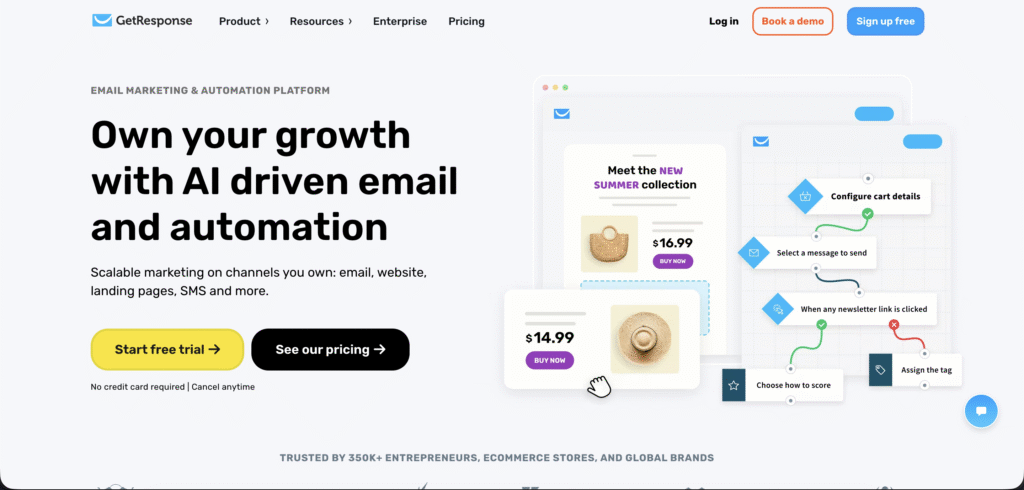
GetResponse is an email marketing platform that has AI technology to help marketers automate and optimize their campaigns. Instead of manually designing emails and sending them at random, GetResponse AI analyzes user behavior, predicts patterns, and helps you make messages that relate with your audience.
Some of the key features include:
- AI powered line generator that increase open rates
- Email personalization based on usage and preferences
- Automated content suggestions for campaigns
- Advanced analytics and reporting to track engagement
- Smart send time enhance for better delivery
For businesses using digital marketing services, integrating AI into email campaigns can improve overall ROI and complement SEO and web development strategies.
Why Use AI in Email Marketing
AI is not just a trend. It’s a tool that enables marketers to:
- Save time by automating repetitive tasks
- Increase engagement through predictive personalization
- Optimize campaigns using data driven insights
- Enhance targeting with segmentation and behavior analysis
- Boost ROI with smarter campaign scheduling
When combined with social media marketing or digital marketing services, AI powered email campaigns can help create an integrated marketing strategy.
How to Use GetResponse AI Features
Here’s a guide for beginners and marketers looking to use AI effectively:
Step 1: Sign Up and Integrate
- Create a GetResponse account or log in
- Connect your email list and import contacts
- Integrate with tools like CRM, e commerce platforms, or extracting trends
Step 2: Generate AI Subject Lines
- Navigate to AI subject line generator
- Input your email topic or campaign theme
- Review AI suggestions and select the ones that fit your audience
Step 3: Personalize Content
- Use AI driven recommendations for email body content
- Add dynamic personalization for user name, location, or purchase history
- Incorporate images, buttons, or GIFs to increase clicks
Step 4: Optimize Send Times
- AI analyzes historical engagement data
- Suggests the best send times for maximum open rates
- Schedule emails automatically without manual guesswork
Step 5: Monitor Analytics and Improve
- Track open rates, click through rates, and conversions
- Use AI recommendations to improve future campaigns
- Segment your audience for highly targeted campaigns
Features Marketers Love
- Predictive analytics to forecast user behavior
- Content automation to suggest relevant email copy
- Multichannel integration with social media and landing pages
- Segmentation tools for precise targeting
Comparison: GetResponse AI vs Traditional Email Marketing
| Feature | GetResponse AI | Traditional Email Marketing |
|---|---|---|
| Subject Line Creation | AI powered, optimized | Manual, less effective |
| Send Time | AI predicts optimal time | Manual scheduling |
| Content Suggestions | Automated | Manual copywriting |
| Engagement Tracking | Real time predictive analytics | Basic reporting |
| ROI Optimization | AI driven recommendations | Limited insights |
Best Practices for AI Email Marketing
- Keep emails concise and readable
- Always include a call to action
- A/B test AI generated subject lines for best results
- Use AI content suggestions for newsletters, product announcements, and campaigns
- Combine AI emails with SMM blog content for higher click rates
Real World Use Cases
- E commerce brands: Personalized product recommendations
- Agencies: Automating client email campaigns
- Startups: Launch campaigns faster with minimal staff
- HR teams: Internal updates and onboarding sequences
Pros and Cons
Pros
- Saves time and effort
- AI generates high performing subject lines and content
- Data driven insights improve ROI
Cons
- Some personalization may feel generic
- Limited human creativity in automated content
- Advanced AI features may require higher subscription plans
Pricing (2026)
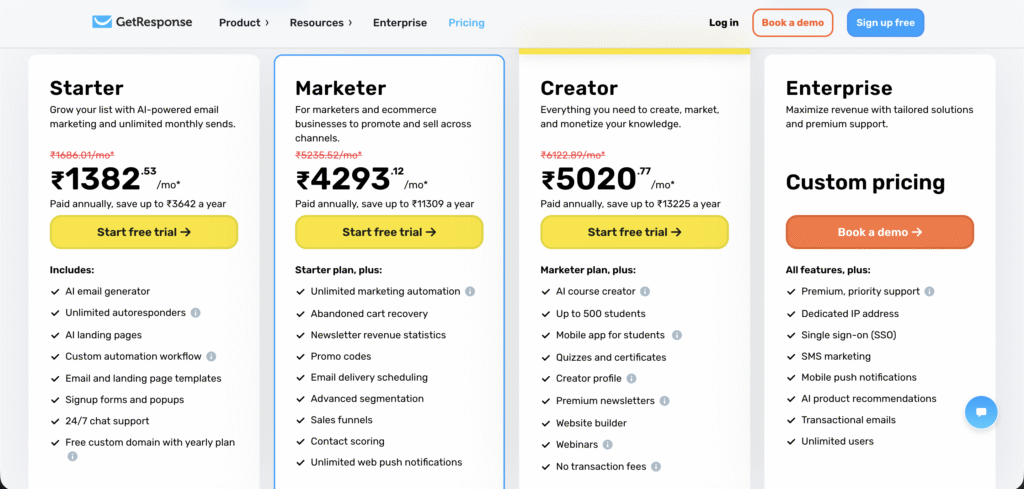
- Starter: ₹1382/month
- Marketer: ₹4293/month
- Creator: ₹5020/month
- Enterprise: Custom pricing
How AI Email Marketing Boosts Branding & ROI
- Increases customer engagement with personalized content
- Reduces bounce rates through optimized send times
- Supports multi channel campaigns when combined with SEO services and web development
- Enhances global reach through AI driven language optimization
Conclusion
GetResponse AI features is a tool for marketers, businesses, and startups aiming to save time, increase engagement, and improve ROI. By automating content creation, send times, and analytics, it allows you to focus on strategy and growth.
For best results, integrate AI email marketing with digital marketing services, and SEO strategies from Digehub to maximize impact.
Explore Digehub services to learn how AI driven campaigns can transform your business.
FAQs
1) Is GetResponse AI free?
No, it’s subscription based but offers trial options for testing features.
2) Can I personalize AI generated emails?
Yes, AI content suggestions can be personalized with names, locations, and past interactions.
3) How long does it take to launch a campaign?
AI tools reduce setup time, usually under 30 minutes for basic campaigns.
4) Does GetResponse AI work with social media?
Yes, it integrates with social channels for cross platform campaigns.
5) What’s the best use case?
Product launches, newsletters, automated follow ups, and customer engagement campaigns.