
Website Redesign in Chennai Without Losing Your Google Rankings
A new website should bring in more enquiries, but a careless redesign can erase years of Google rankings within weeks. The cause is rarely the design itself. It is usually changed URLs, missing redirects or a staging setting left switched on. Here is how to redesign without losing what you have earned.
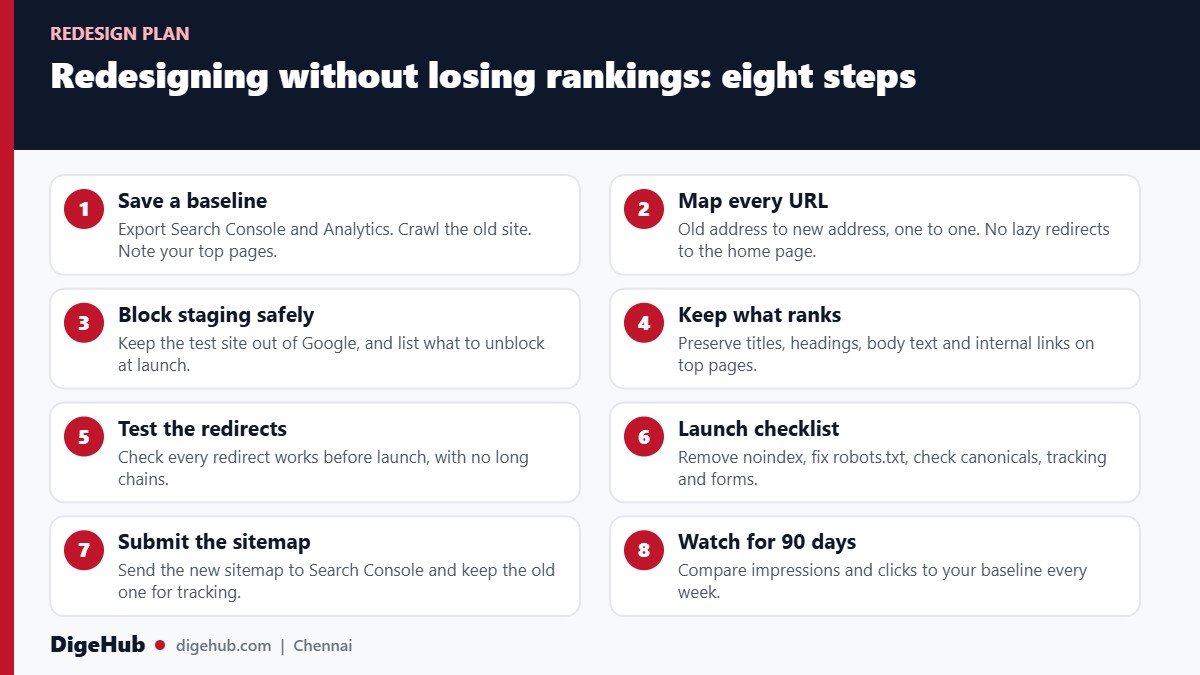
Why redesigns lose traffic
Google ranks URLs, not websites. Each page you have today has an address, a history and links pointing to it. A redesign is risky because it often changes those addresses, the text on them, or Google’s ability to read them. Here are the usual causes and what they do.
| What changes in the redesign | What breaks | How it shows up |
|---|---|---|
| URLs change with no redirect | Old pages return “not found”, and their links and history are lost | Sharp drop in impressions within days |
| Everything redirects to the home page | Google treats these as unrelated, so page-level rankings do not transfer | Service pages disappear from search |
| Staging noindex or robots.txt block stays on | Google is told not to index the new site | Pages fall out of the index entirely |
| Text, headings and titles are rewritten | The page no longer matches the searches it ranked for | Gradual loss on specific searches |
| Internal links are rebuilt differently | Important pages lose the links that signalled their importance | Key pages slip, minor pages rise |
| Heavier, slower design | Mobile pages miss Core Web Vitals thresholds | Higher bounce rate, weaker rankings over time |
| Content loads only through scripts | Google may not see text that needs scripts to appear | Pages indexed with little or no content |
| Tracking forgotten | Analytics and conversion events stop | No one can tell what happened |
Almost all of these are preventable. The Google Search Central guide to site moves is clear on the basics, and the plan below follows it. If you want a sense of how this fits into an overall SEO plan, read our SEO agency in Chennai page.
Google’s own guidance says hiring an SEO is most useful during a site redesign or a new site launch. Bring SEO in at the planning stage, when decisions about URLs and structure are still cheap to change, not after launch when the damage is done.
First, decide how big a change you are really making
Not every redesign carries the same risk. Be honest about which kind you are doing, since it determines how much care you need.
| Type of change | URLs change? | Risk | What to do |
|---|---|---|---|
| Visual refresh: new colours, layout, images, same platform and URLs | No | Low | Keep text and structure. Test speed and mobile. |
| New theme or template on the same CMS | Usually no | Low to medium | Compare titles, headings and links before and after. |
| Change of platform, for example to Shopify or WordPress | Often | Medium to high | Full URL map and redirects. Shopify uses fixed paths such as /products/ and /collections/, so URLs will change. |
| Restructure: merge or remove pages, new menu | Yes | High | Redirect each removed page to its closest match. |
| New domain name | Yes (domain) | Highest | Redirects plus Google’s Change of Address tool for each verified old variant. |
The practical rule: if your URLs can stay the same, keep them. A pretty new design on the same addresses is far safer than a slightly better structure with new ones. Change the structure later, as a separate step, once the new design is stable.
Before you start: save the evidence
You will want proof of how the old site performed, both to guide the project and to judge it afterwards. Do these five things before any design work begins.
- Export Search Console. Download queries and pages for the longest period available. This is your performance baseline.
- Export Analytics. Organic sessions and conversions (calls, forms, WhatsApp clicks) by page.
- Crawl the old site. Use a crawler to list every URL with its title, headings, status, and internal links. Save the file. This is your map of what exists.
- Rank your pages. Sort by clicks, enquiries and backlinks. The top 20 pages are the ones to protect above all else.
- Back up everything. Full site files and database, stored outside the old server.
A proper SEO audit before the redesign is the cleanest way to do this, because it also shows what is worth fixing while you are rebuilding.
The URL map: the most important document in the project
A URL map is a spreadsheet with two columns: the old address and the new one. Every old URL that has traffic, links or enquiries needs a row. Google’s guidance on site moves sets out the rules to follow.
- Use permanent redirects. A 301 or 308 server-side redirect tells Google the page has moved for good. Google says permanent redirects do not cause a loss of PageRank.
- Redirect straight to the final page. Chains of redirects slow things down. Google suggests ideally no more than three, and fewer than five at most.
- Match like with like. Send each old page to the new page that serves the same purpose. Do not send many old URLs to one unrelated page such as the home page.
- Return 404 or 410 for pages that are truly gone and have no good replacement.
- Keep the redirects for at least a year. Google says generally at least one year, and longer if you can.
- Include images, PDFs and other files that have links or traffic.
Here is a short example of what the map looks like.
| Old URL | New URL | Redirect | Note |
|---|---|---|---|
| /services/seo-chennai.html | /seo-services/ | 301 | Top page by clicks. Keep the headings and text. |
| /about-us.html | /about/ | 301 | Same purpose |
| /blog/post-id-482 | /blog/how-to-choose-an-seo-agency/ | 301 | Has backlinks |
| /old-offer-2019 | None | 410 | Expired, no replacement |
These rows are illustrative. Your own map will have as many rows as your crawl finds pages that matter.
Design and content: keep what ranks
It is tempting to rewrite everything for the new look. Resist that on the pages that earn your enquiries. For the top 20 pages:
- Keep the main text, headings and title tags unless you have a clear reason to improve them, and improve them in a later step so you can tell what caused any change.
- Keep internal links to important pages in the new menu, footer and body text. Our on-page SEO checklist lists what to check.
- Make sure content is in the page’s HTML, not loaded only by scripts or placed in images. Use the URL Inspection tool to see what Google sees.
- Keep structured data such as business details and reviews.
- Test mobile speed. Google’s Core Web Vitals use the 75th percentile of real visits, with thresholds of 2.5 seconds for Largest Contentful Paint, 200 milliseconds for Interaction to Next Paint and 0.1 for Cumulative Layout Shift. New designs often add large images, sliders and animation that push pages past these limits.
- Keep Tamil and English versions consistent if you publish both. See Tamil SEO in Chennai.
A redesign is a good moment to fix real problems, such as thin pages and slow templates. Just do it in a controlled order: protect first, improve second. The technical SEO checklist covers the technical checks in detail.
Staging, launch day and the mistakes that cost the most
The most expensive redesign mistakes are small settings. Google lists the common ones: leftover noindex tags or robots.txt blocks from development, redirects pointing to pages that do not exist, sitemaps that still list old URLs, and servers that cannot cope with the extra crawling after launch.
On staging
Keep the test site out of Google, either with a password or a noindex setting. Write down every block you add so you can remove each one. Prepare the live robots.txt in advance so it matches what should be crawlable at launch.
Launch-day checklist
- Remove staging blocks. Check the noindex tag, the WordPress “discourage search engines” setting and robots.txt.
- Switch on the redirects and test a sample of old URLs, with Search Console’s URL Inspection tool or a script.
- Check canonical tags. Each new page should point to itself, and hreflang tags (if used) should point to new URLs.
- Submit the new sitemap in Search Console. Save the old sitemap too, so you can see old URLs drop and new ones rise.
- Test tracking and forms. Place a test call tap, a WhatsApp click and a form submission, and confirm each is recorded.
- Update outside links you control: your Business Profile website link, social profiles, email signatures and ad landing pages.
- For a domain change, use Search Console’s Change of Address tool for every verified old variant. Google says it is not needed for HTTP to HTTPS, www to non-www, or path-only changes.
- Time the launch for a quiet period and avoid changing anything else that month.
If something goes wrong, you want a full working day to find and fix it. Pick a weekday morning when your team and developer are both available.
After launch: the 90-day watch
Google says that on a medium-sized site it can take a few weeks or more for new URLs to replace old ones, since Googlebot has to visit each old and new address at least once. Rankings may fluctuate along the way and then settle. Plan to monitor, not to panic.
| When | What to check | What a problem looks like |
|---|---|---|
| Days 1 to 3 | Redirects, indexing of the home and top pages, forms, calls, WhatsApp | Spikes in “not found” errors, key pages not indexed, no enquiries recorded |
| Week 1 | Search Console Pages report and sitemap report | New sitemap stuck near zero, unexpected exclusions |
| Weeks 2 to 4 | Impressions and clicks against your baseline, top 20 pages | Steady decline on specific pages or searches |
| Months 2 to 3 | Rankings for key searches, organic enquiries, speed on mobile | Recovery stalls, or enquiries stay below baseline |
If traffic does drop, work through the causes in order: indexing, redirects, content changes, then speed. Our guide to diagnosing a website traffic drop gives the full process. For a sense of the timelines involved, see how long SEO takes.
Choosing a developer or agency for the redesign
Many Chennai businesses hire a designer who is excellent at layouts and has never handled a migration. Ask any developer or agency you are considering these questions:
- Will you build a URL map and redirect plan, and can I see an example from a past project?
- How will you keep staging out of Google, and who removes the block at launch?
- What will you do about page speed on mobile, and how will you measure it?
- Who owns the domain, hosting and site files when the project ends?
- What support do you provide for the first 90 days?
If the answers are vague, bring in an SEO to review the plan. At DigeHub, our web development and SEO work happen together, so redirects and structure are planned from the first week. If you already have a designer, we can review the plan, the URL map and the staging set-up before launch. Send us the details on WhatsApp and we will give you a straight opinion.
Frequently asked questions
Will a redesign hurt my Google rankings?
Should I redesign my website and change my domain at the same time?
How long do redirects need to stay in place?
Do I need an SEO for a redesign?
How long until traffic recovers if it dips?
Can I redesign a website without changing any URLs?
Sources and further reading
- Google Search Central: Site moves with URL changes
- Google Search Central: Do you need an SEO?
- web.dev: Web Vitals thresholds
- Google Search Console Help: Page indexing report
- Google Search Console Help: Users, owners and permissions
- Google Keyword Planner (India, English), checked 5 November 2026: “website redesign chennai” 100 to 1K monthly searches
Want this done for your Chennai business?
Tell us what you sell and where your customers are. We will send a straight answer on what is worth doing first, with no lock-in contract.
- Free audit of your site, Google Business Profile and AI answers
- Reply within 2 business hours on WhatsApp
- Month-to-month plans from ₹40,000